
Cash App has supported Bitcoin since 2018, making it one of the earliest mainstream personal finance apps to offer crypto functionality. With tens of millions of users, it remains a popular entry point for people who want to buy, hold, or send Bitcoin without opening a separate exchange account.
When it comes to sending Bitcoin, Cash App provides two distinct paths: standard on-chain transfers that settle directly on the Bitcoin blockchain, and Lightning Network transfers that route through a faster, lower-cost second layer. Understanding the difference — and knowing the fee structure and limits that apply to each — can save you both time and money.
This guide covers everything you need before you start, a streamlined four-step sending process, a clear breakdown of fees and limits, common issues and fixes, and a practical look at when Cash App is the right tool and when a more capable platform makes more sense.
Editorial note: This guide reflects Cash App's Bitcoin features as of May 2026. Fee tiers and transfer limits are subject to change; always verify the current figures on the confirmation screen before authorizing a transaction.
Before You Start — 3 Requirements
Many users run into problems mid-transaction simply because a prerequisite was not in place. Addressing these three requirements before initiating any transfer will prevent the most common points of failure.
1. Update the app and confirm Bitcoin is enabled
Make sure you are running the latest version of Cash App. If the Bitcoin tab is not visible on your home screen, update the app through the App Store or Google Play. If it still does not appear after updating, force-close the app, restart your device, and relaunch. In some regions, Bitcoin features may be subject to a staged rollout or availability restrictions.
2. Complete identity verification (KYC)
Bitcoin features on Cash App are not accessible without verified identity. You will need to provide your full legal name, date of birth, and the last four digits of your Social Security number. In some cases, Cash App will also request a photo of a government-issued ID such as a driver's license or passport. This verification requirement exists to comply with anti-money laundering (AML) and Know Your Customer (KYC) regulations. Identity verification is the most common reason users can purchase Bitcoin but are unable to send it, so completing this step early avoids delays later.
3. Prepare a valid recipient credential
Since late 2024, Cash App no longer supports sending Bitcoin directly to another user's $Cashtag. To send Bitcoin, you need either a full on-chain Bitcoin wallet address (a long alphanumeric string) or a Lightning Network invoice (for Lightning transfers). If you are sending to an external wallet or exchange, use the wallet address that platform provides for Bitcoin deposits. Make sure the destination supports Bitcoin on the main network — sending to an incompatible address or a different network can result in permanent loss of funds.
How to Send Bitcoin on Cash App — 4 Steps
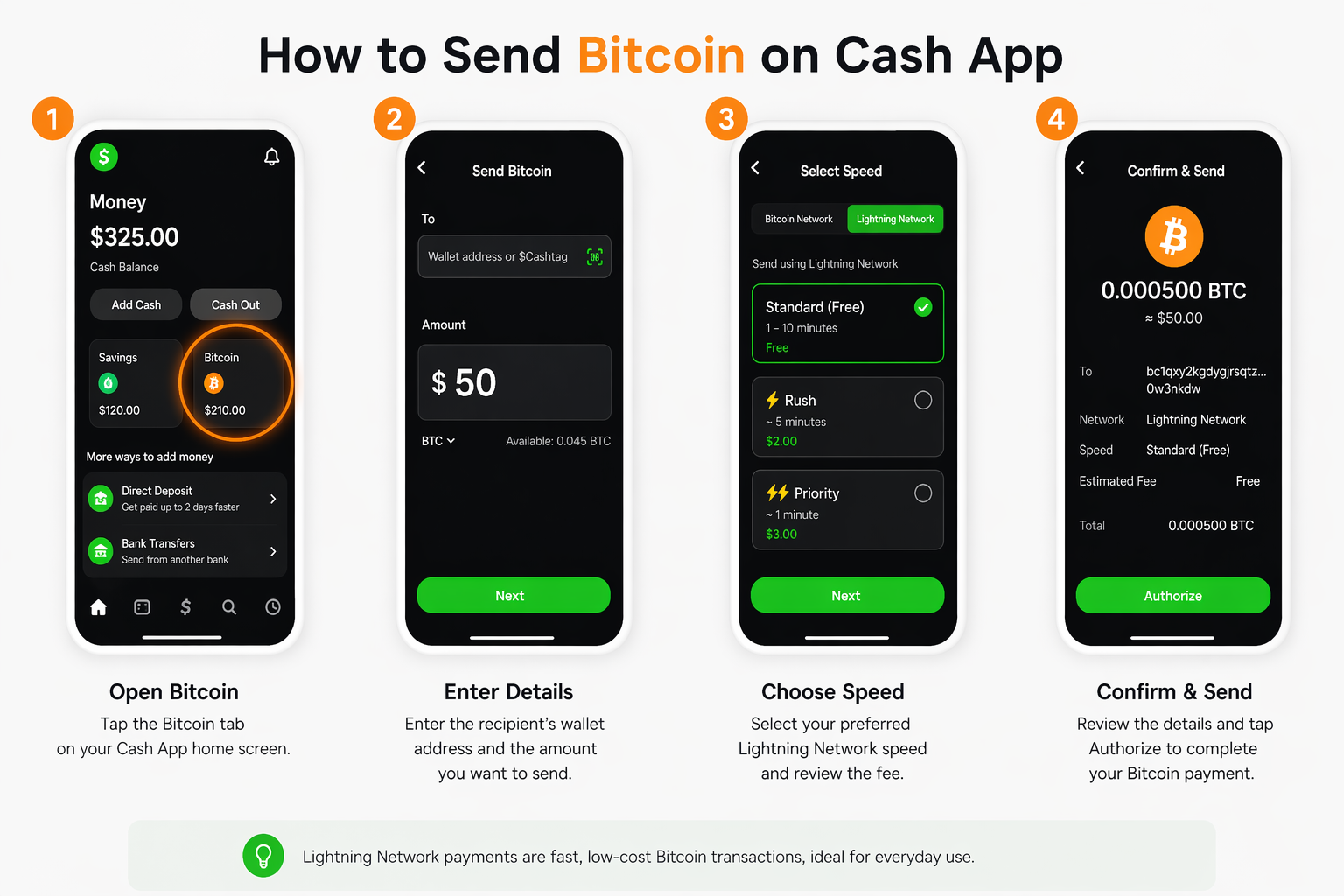
Once the prerequisites above are met and your Bitcoin balance is sufficient, the actual sending process is straightforward.
Step 1: Open the Bitcoin sending screen
Open Cash App and tap the Money tab at the bottom of the screen. Select Bitcoin, then tap the arrows icon (the send/receive toggle). From the options that appear, choose Send.
Step 2: Enter recipient information and the amount
Paste the recipient's Bitcoin wallet address or Lightning invoice into the recipient field. If the recipient has a QR code, you can scan it directly using the app's camera. Next, enter the amount you want to send. You can input the value in US dollars and Cash App will automatically calculate the equivalent BTC amount based on its internal rate. Note that Cash App uses a spread-based pricing model rather than the mid-market rate — you can check the live Bitcoin price on a transparent feed before entering your amount to understand the effective cost of your transfer.
Before moving on, verify the wallet address carefully — Bitcoin transactions are irreversible, and sending to an incorrect address means the funds cannot be recovered.
Step 3: Choose your transfer network and speed
This is where you decide how fast your transaction will process and what, if anything, it will cost.
For Lightning Network transfers, the transaction settles in seconds with fees that are typically a fraction of a cent. This option requires the recipient to provide a Lightning invoice rather than a standard wallet address, and is subject to a $999 limit per rolling 7-day period.
For on-chain transfers, Cash App offers three speed tiers:
-
Standard — Free for transfers of $100 or more in BTC; may take up to 24 hours to confirm.
-
Rush — Processes within approximately 2 hours; includes an additional fee of up to $2 plus a proportional network charge.
-
Priority — Targets confirmation within 10 minutes; carries an additional fee of up to $3 plus a proportional network charge.
If your transfer is not time-sensitive, the Standard tier is the most cost-efficient option for amounts that qualify. For a deeper look at how miner fees affect what you actually pay, see Tapbit's guide to Bitcoin transaction fee structures.
Step 4: Review, authorize, and track
On the confirmation screen, check the recipient address, the BTC amount, the selected network, and the estimated fee before proceeding. Once everything looks correct, authorize the transaction using your PIN, Face ID, or fingerprint. After submission, you can monitor the transfer status at any time by tapping the clock icon in the bottom-right corner of the home screen to open the Activity tab.
Fees and Limits — What You Need to Know
Understanding the fee structure and transfer limits in advance helps you plan transactions more efficiently and avoid unexpected costs or rejections.
Fee structure by transfer type
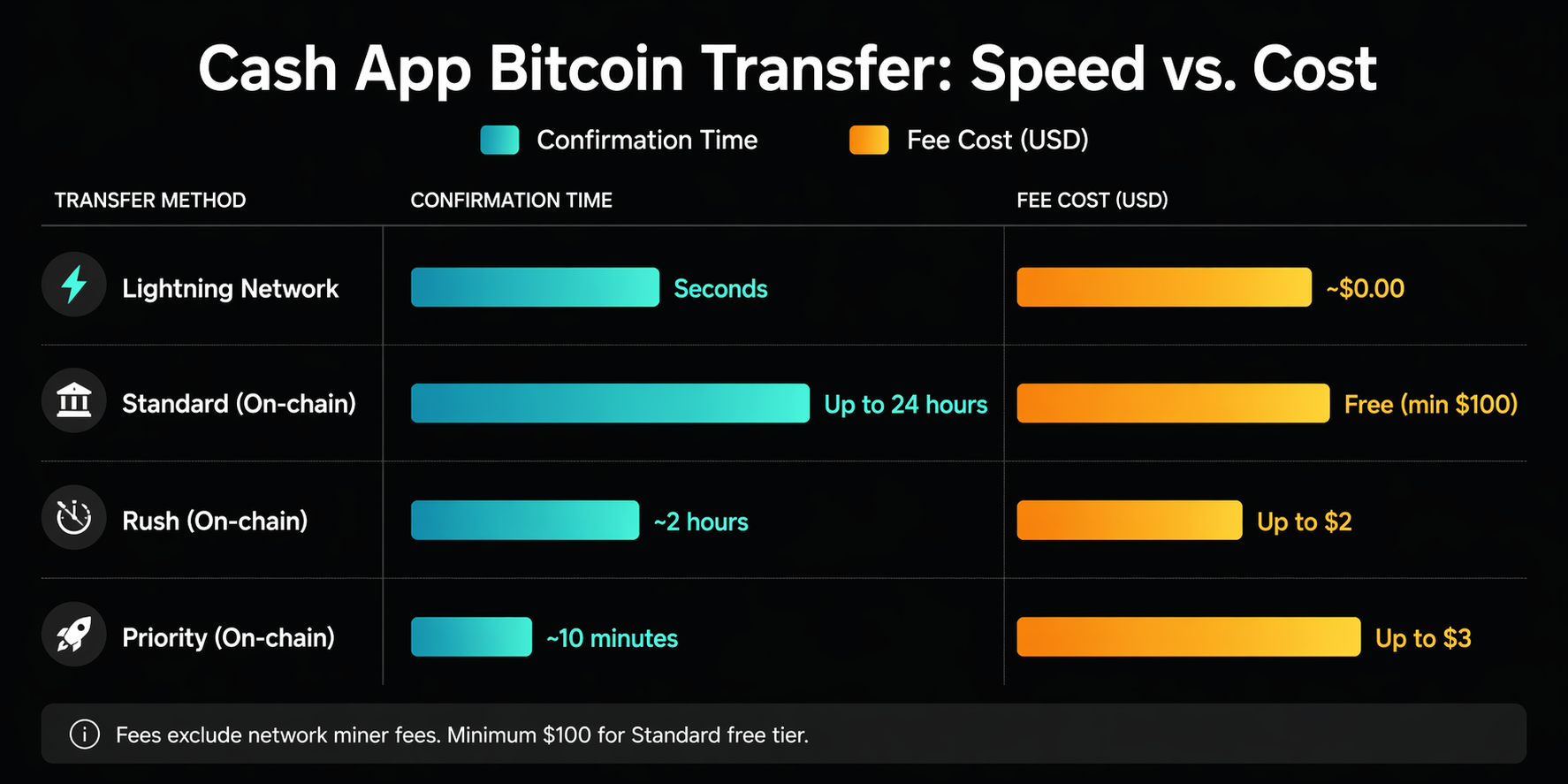
Fee tiers are subject to change; always confirm on the in-app confirmation screen before authorizing.
A few points worth noting: the fees shown above apply to the sending process itself and are separate from any spread Cash App applies when you buy or sell Bitcoin within the app. On-chain fees also incorporate a network (miner) fee that fluctuates based on Bitcoin blockchain congestion, in addition to any speed-tier surcharge Cash App applies. Cash App displays the estimated total fee on the confirmation screen before you authorize, so there are no surprises at the final step.
As of December 20, 2024, Cash App discontinued its feature allowing fee-free Bitcoin transfers between users via $Cashtag, and this has not been reinstated as of May 2026. Free on-chain transfers are still available for amounts of $100 or more but follow the Standard timeline of up to 24 hours.
By contrast, dedicated exchanges like Tapbit publish a transparent maker/taker fee structure and offer VIP tiers for higher-volume traders who want to reduce costs further — something Cash App does not provide.
Transfer limits
Cash App enforces rolling limits across 1-day, 7-day, and 30-day windows. These limits reset on a rolling hourly basis, not at a fixed midnight reset. To check your current available limits, go to your profile icon, select Bitcoin, and scroll to the Limits section. If you are approaching a cap, the app will display a warning before you confirm the send.
Lightning Network transfers operate under a separate limit of $999 per rolling 7-day period . For incoming deposits from external wallets, the limit is $10,000 worth of BTC per 7 days. Verified accounts generally have higher thresholds, and limits may be adjusted over time based on account activity.
Common Issues and How to Fix Them
Most problems that arise when sending Bitcoin on Cash App fall into one of three categories.
Transaction stuck in pending status
If you selected the Standard speed tier, a wait of up to 24 hours is expected and does not indicate a problem. For Rush or Priority transfers that appear stuck, first check your internet connection and refresh the app. Then confirm in the Activity tab that the transaction was actually submitted. If your account is near a sending limit, this can also delay or hold a transaction. For transfers that remain unresolved after an extended period, contacting Cash App support directly is the appropriate next step.
Recipient wallet has not received the Bitcoin
Double-check the wallet address you entered character by character. A single incorrect character will either cause the transaction to fail or direct funds to an unintended address. Also confirm that the recipient's wallet supports Bitcoin on the main network — some wallets display similar-looking addresses for other cryptocurrencies or testnets. If you used a Lightning invoice, note that invoices expire after 72 hours; if the invoice has expired, ask the recipient to generate a new one.
Transaction declined or flagged
Cash App's fraud monitoring system may flag transactions that appear unusual, such as large amounts sent suddenly, multiple rapid transfers, or sends to wallets associated with elevated risk. If your transaction is blocked, you will typically need to contact Cash App support to resolve it. Ensure your identity verification is fully complete, as incomplete KYC can also result in transaction blocks even after a period of successful use.
Cash App vs. a Dedicated Exchange — When to Consider Upgrading
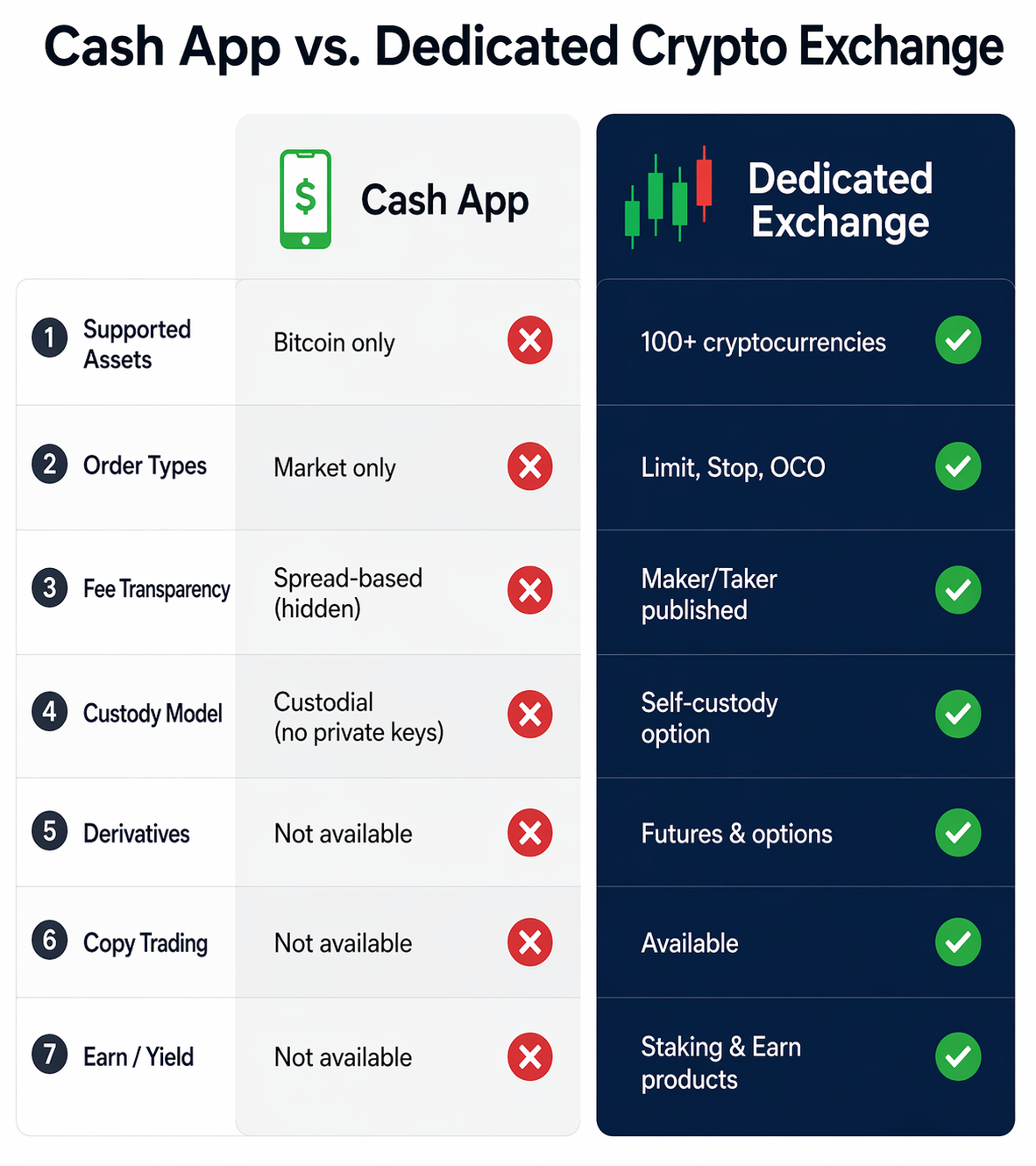
Cash App is well-suited for a specific type of user: someone who is new to Bitcoin, wants a simple interface, and only needs to buy, hold, or occasionally send small amounts. The integration with everyday payments is genuinely convenient, and the app handles the technical complexity of Bitcoin custody on behalf of the user.
That said, Cash App has real limitations that become more relevant as a user's needs grow:
-
Single-asset only. Cash App supports only Bitcoin — there is no access to Ethereum, Solana, or other major cryptocurrencies.
-
Spread-based pricing. Buying Bitcoin through Cash App uses a spread-based model, meaning the effective price you pay is typically higher than what you would find on a transparent, order-book-based exchange. You can compare this by checking the live Bitcoin market price before any purchase.
-
No advanced order types. There are no limit orders, stop-loss orders, or any of the execution tools active traders use to manage positions. On Tapbit, for example, you can trade BTC/USDT spot with full order-book access.
-
Custodial model. Cash App holds your private keys on your behalf. Users who want true self-custody should consider transferring funds to a non-custodial wallet.
-
No derivatives access. For users who want to hedge positions or trade with leverage, platforms like Tapbit offer BTC futures markets alongside spot trading — something Cash App was never designed to support.
For users who have moved beyond simple transfers and want to actively trade, manage a diversified portfolio, or execute larger transactions with transparent pricing, creating an account on a dedicated exchange gives you the infrastructure Cash App cannot. Tapbit also offers a copy trading feature for users who want to mirror experienced traders, and earn products for putting idle Bitcoin to work. You can review Tapbit's proof of reserves at any time for transparency on asset backing.
References
-
Cash App Help Center — Bitcoin Sending Limits and Fees: https://cash.app/help/us/en-us/5106-bitcoin
-
Cash App Help Center — Lightning Network Transfers: https://cash.app/help/us/en-us/lightning-network
-
Cash App Help Center — Bitcoin Deposit Limits: https://cash.app/help/us/en-us/bitcoin-deposit
FAQ
Can I send Bitcoin on Cash App without buying it there first?
Yes. If you receive Bitcoin from an external wallet into your Cash App Bitcoin address, you can then send that BTC to another wallet or keep it in your Cash App balance. To find your deposit address, go to the Bitcoin tab and select Deposit Bitcoin. Note that the $10,000 per 7-day deposit limit applies regardless of where the Bitcoin originated (Cash App Help Center — Bitcoin Deposit Limits, May 2026).
What happens if I send Bitcoin to the wrong address?
Bitcoin transactions are final once broadcast to the network. If you send BTC to an incorrect address — whether due to a typo or a misidentified recipient — there is no mechanism to reverse or cancel the transaction. The only way to recover the funds would be if the owner of the receiving address voluntarily returns them. This is why verifying the recipient address before confirming is critical.
Is sending Bitcoin on Cash App a taxable event?
Tax treatment varies by jurisdiction. In many countries, transferring Bitcoin between two wallets you personally control is not considered a taxable event. However, selling Bitcoin, using it to make purchases, or sending it as payment to another party may trigger a capital gain or loss. Cash App provides a Form 1099-B for applicable transactions in the US. Given the complexity and variation in local rules, consulting a tax professional familiar with cryptocurrency is advisable if you are unsure how your activity is classified.
How do I check the status of a Bitcoin transfer I already sent?
Tap the clock icon in the lower-right corner of the Cash App home screen to open the Activity tab. All recent and pending transactions are listed there, along with their current status. For on-chain transfers, you can also use the transaction ID (TXID) to track progress on a public Bitcoin block explorer.
What is the difference between on-chain and Lightning Network transfers on Cash App?
On-chain transfers are settled directly on the Bitcoin blockchain. They are the more established method, suitable for any amount, and have no special recipient requirements beyond a standard Bitcoin address. Confirmation time ranges from minutes to 24 hours depending on the speed tier selected. Lightning Network transfers use a second-layer protocol built on top of Bitcoin that enables near-instant settlement with very low fees. They require the recipient to provide a Lightning invoice and are best suited for smaller, time-sensitive transfers under the $999 weekly limit.


