
Let’s be honest: nobody actually enjoys updating their passwords. It’s tedious. But in the crypto market, your password isn't just a login—it’s the literal vault door protecting your portfolio.
We see it on the trading desk all the time. Traders spend hours analyzing charts and perfecting their strategies, only to put their funds at risk because they reused an old password from a compromised email account.
Whether you are doing a routine security sweep or you've noticed something off about your account activity, updating your credentials on the Tapbit Exchange takes less than three minutes.
Here is exactly how to get it done.
(Note: If you are reading this and haven't actually set up your trading account yet, register for your free Tapbit account here and make sure to use a strong password from day one).
Read This Before You Start: The 24-Hour Withdrawal Lock
Before we get into the steps, there is a hardcoded security rule you need to be aware of.
Whenever you change your password on Tapbit, all cryptocurrency withdrawals and P2P transfers are instantly frozen for 24 hours. This isn't a glitch; it's a deliberate security cooldown. If a hacker somehow manages to access your account and change your password to lock you out, this 24-hour window stops them from immediately draining your wallets. It buys you the time you need to contact our support team and freeze the account.
Bottom line: Do not change your password right now if you need to make an urgent withdrawal in the next few hours.
The Step-by-Step Password Change Process
Have your current password ready, along with your phone (for your Google Authenticator or email verification codes).
Step 1: Head to the Security Center
First, log in to your Tapbit account on your desktop or through the mobile app.
-
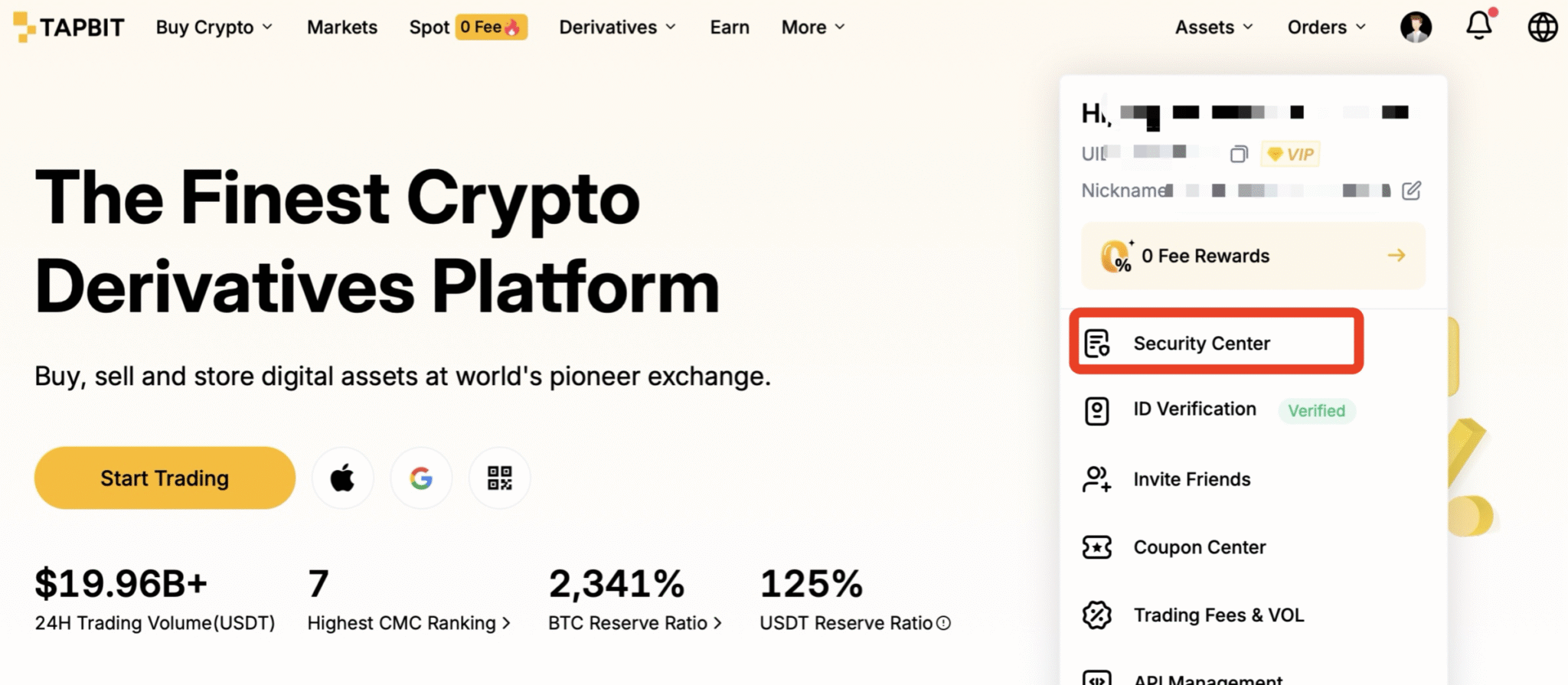
Look up at the top-right corner of your dashboard and find your Profile Icon.
-
Click it to drop down the menu, and hit Security Center.
Step 2: Trigger the Change
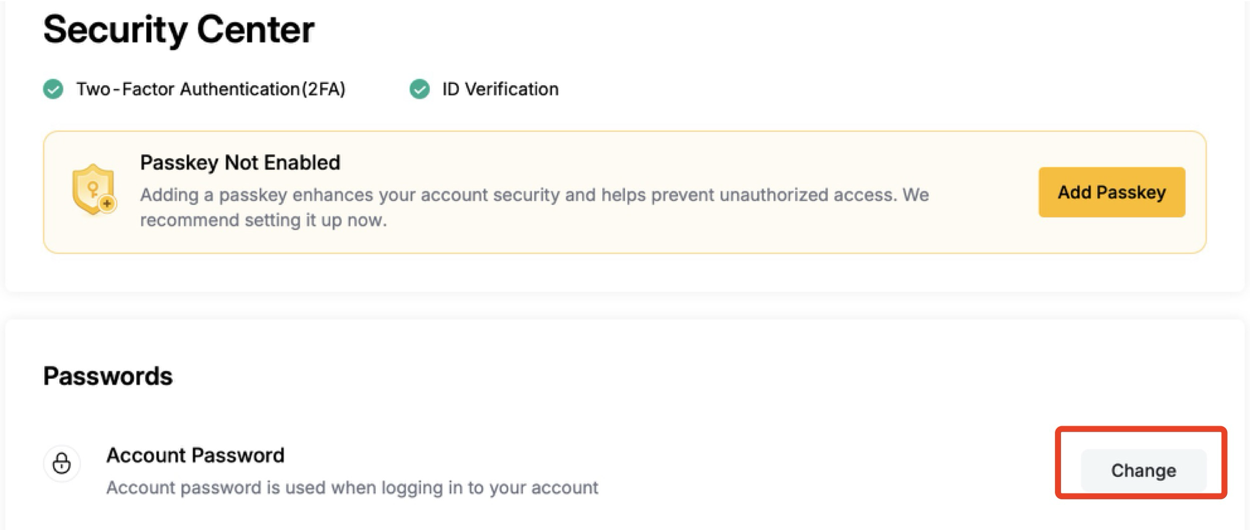
Inside the Security Center, you'll see a dashboard showing all your active security layers (like your linked email and phone number).
-
Look for the row labeled Account Password.
-
Click the Change button right next to it.
Step 3: Create a Hard-to-Crack Password
The system will ask for your old password, followed by your new one. To make sure your account is actually secure, Tapbit forces you to meet a few strict cryptographic rules. Your new password must have:
-
Length: 8 to 40 characters.
-
Numbers: At least one number (0-9).
-
Uppercase: At least one capital letter.
-
Symbols: At least one special character (like ! @ # $ % & *).
Pro-Tip: Please don't use your pet's name followed by "123!". Use a reputable password manager to generate a random string of characters and store it for you.
Step 4: Verify It’s Actually You
Once you hit confirm, we need to prove that you are the one making the request.
-
The system will prompt you to enter a 6-digit code sent to your email.
-
If you have Two-Factor Authentication (2FA) turned on, you can also punch in the live code from your Google Authenticator app.
Once that goes through, you are done. The system will automatically log you out of all devices, and you can log back in with your fresh credentials.
What to Do Next
Now that your account is locked down, you can trade with peace of mind. Instead of just holding stablecoins and staring at live crypto prices waiting for a dip, put your capital to work.
Check out Tapbit Flexible Savings—where you can currently earn up to 15% APY on your USDT. It’s a great way to generate institutional-grade yield on your idle assets while maintaining the flexibility to pull your funds out the second you spot a trading opportunity.
Frequently Asked Questions (FAQ)
Can I change my password if I don't have Two-Factor Authentication (2FA) turned on?
Yes, you can update your password using just email verification. That being said, running a crypto account without Google 2FA is incredibly risky. We highly recommend turning on 2FA while you are already inside the Security Center.
How often should I actually be changing my password?
Cybersecurity experts generally recommend swapping out exchange passwords every 3 to 6 months. Also, if you ever log into Tapbit on a public Wi-Fi network (like at a coffee shop or airport) or a shared computer, change your password the minute you get home.
Help, I think someone else is in my account. What do I do?
If you get a login alert from an IP address or device you don't recognize, act fast:
-
Follow the steps above to change your password immediately. (Doing this automatically forces a log-out on whatever device the hacker is using).
-
Double-check that your Google 2FA is still active.
-
Reach out to Tapbit’s 24/7 Customer Support right away so we can review the account logs and make sure your funds are safe.
Will changing my password cancel my open trades?
No. The 24-hour security lock only impacts withdrawals moving off the exchange. Any open spot limit orders, grid trading bots, or leveraged futures positions you have running will stay active and completely unaffected.


