

Skywork AI is an AI workspace that turns instructions and source material into finished work products. Instead of returning only a chat response, its specialized agents can research a topic and produce editable documents, presentations, spreadsheets, data visualizations and websites. This makes it useful for people who want to move from an idea to a structured deliverable without switching between several separate tools.
The platform is designed around outcome-based prompts. You describe what you need, provide files or links when relevant, choose the appropriate agent and review the generated result. Skywork can accelerate the first draft, but users remain responsible for checking facts, calculations, citations, permissions and final presentation quality.
If you use AI tools to organize crypto research or prepare market notes, you can also create a Tapbit account to explore digital-asset markets alongside your research workflow. Skywork and Tapbit are separate services; the link is simply a convenient next step for readers interested in crypto markets.
What Is Skywork AI?
Skywork describes itself as an AI workspace built around specialized agents. Its current product includes dedicated skills for Documents, Slides, Sheets and Websites, as well as a general workspace and other media tools. The core idea is delegation: users specify the desired result, while the agent plans the work, gathers or interprets information and assembles an editable artifact.
This differs from a basic chatbot in two ways. First, each agent is optimized for a particular output. Second, the workflow can combine research, writing, structure, formatting and visual presentation. The result may still require substantial human revision, but much of the blank-page work is handled in one process.
How Do Skywork’s AI Agents Work?
A typical Skywork project follows a simple sequence:
- Define the deliverable. State whether you need a report, pitch deck, analysis workbook or responsive webpage.
- Add context. Upload notes, PDFs, spreadsheets or brand guidelines, and include reliable links when necessary.
- Select the right agent. Use Documents for long-form writing, Slides for presentations, Sheets for structured data and Websites for web experiences.
- Review the plan and draft. Check the outline, evidence, formulas, layouts and assumptions before accepting the output.
- Refine and export. Request focused revisions instead of restarting the entire task.
Which Skywork Agent Should You Use?
| Goal | Best workspace | Useful input | Check before use |
|---|---|---|---|
| Report, brief or proposal | Documents | Research question, sources, audience and length | Citations, claims and tone |
| Pitch deck or lesson | Slides | Outline, brand rules, data and desired slide count | Narrative, chart labels and visual rights |
| Analysis or dashboard | Sheets | Clean spreadsheet, field definitions and calculations | Formulas, missing values and units |
| Landing page or prototype | Websites | Page goal, sections, copy, assets and interactions | Mobile layout, links, forms and privacy |
How to Create Documents With Skywork
Choose the Documents agent and prompt for a specific business outcome. A useful prompt might be: “Create a 1,200-word competitor brief for product managers. Compare three companies using the attached reports, cite each factual claim and end with a recommendation table.” This provides the audience, scope, evidence standard, length and format.
After generation, verify that every source supports the nearby statement. Remove repetition, replace generic wording with domain-specific analysis and confirm that sensitive uploads are permitted under your organization’s data policy. An attractive report is not automatically an accurate one.
How to Build Presentations With Skywork
The Slides agent can combine research, structure and design. Provide the presentation objective, audience, time limit, slide count and visual direction. If brand consistency matters, include approved colors, fonts, logos and examples. Skywork’s official materials say generated decks can be refined at page or element level, which is useful when only one section needs revision.
Review the story before polishing individual slides. Check that the opening establishes the decision or problem, the middle presents evidence and the ending makes the next action clear. Inspect every chart for correct axes, dates and units, then confirm that images and statistics are licensed and current.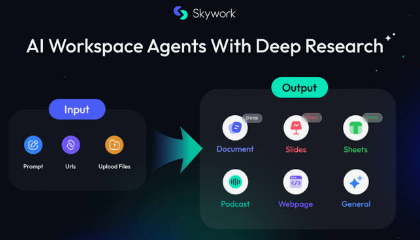
How to Analyze Data With Skywork Sheets
For data tasks, start with a clean file and explain what each column means. Ask for explicit calculations, assumptions and outputs. For example: “Analyze monthly customer retention by cohort, flag incomplete records, calculate three-month retention and create two charts with short interpretations.”
Compare key totals with the original dataset and test several formulas manually. AI may misunderstand dates, percentages, blank cells or duplicated records. Treat generated analysis as a reviewable model, not as an unquestionable answer.
How to Create Websites With Skywork
The Websites workflow is intended to turn a plain-language brief into a full-stack website or web experience. Define the intended visitor, conversion goal, required sections, visual style and interactions. Include exact copy for legal notices, pricing and contact details rather than asking the model to invent them.
Before publishing, test navigation, buttons, forms, responsive behavior, accessibility and page speed. Also check analytics, cookie consent, data collection and ownership of any generated images or code. A working prototype can shorten development time, but production deployment still needs human quality assurance.
Best Practices and Limitations
- Write prompts around the finished outcome, not a vague topic.
- Separate facts from assumptions and ask the agent to label uncertainty.
- Use authoritative, recent sources and keep a record of them.
- Request one focused revision at a time.
- Do not upload confidential material unless its use is approved.
- Verify exports in the software where the file will ultimately be edited or presented.
Feature availability, supported models and export options can vary by account, plan and product version. Check Skywork’s current help center before building a workflow that depends on a specific format or integration.
Conclusion
Skywork AI is best understood as an AI production workspace rather than a single-purpose chatbot. Its specialized agents can reduce the time needed to research, structure and format documents, slides, spreadsheets and websites. The strongest workflow combines a precise brief, reliable inputs and careful human review. Use the agent to accelerate production, then validate the evidence, logic and final user experience yourself.
FAQ
Is Skywork AI free?
Skywork may offer free access or limited usage, while advanced models and higher usage can depend on the current plan. Pricing and quotas can change, so check the official account page.
Can Skywork create PowerPoint files?
Skywork’s official Slides page says decks can be exported to PPTX and used with Google Slides. Confirm the available export controls in your workspace before beginning a time-sensitive project.
Can Skywork analyze an uploaded spreadsheet?
Yes. The Sheets workflow is designed for structured data tasks, calculations and charts. Users should still validate formulas, totals, dates and missing values against the source file.
Can Skywork build a complete website?
The Websites skill is presented as a tool for creating full-stack websites from natural-language instructions. Production use requires testing, security review, accessibility checks and confirmation of hosting or deployment requirements.
Is Skywork output always accurate?
No. Like other AI systems, it can make unsupported claims, misread data or produce outdated information. Verify citations, calculations and important decisions with primary sources and qualified reviewers.


