
What Is Solscan?
Solscan is a blockchain explorer built for the Solana network. In simple terms, it works like a search engine for Solana on-chain data. Instead of searching websites, users search wallet addresses, transaction signatures, token contracts, NFT collections, validators, and smart contract activity.
For beginners, Solscan is most useful when something happens on Solana and you want to verify it yourself. If a transfer looks delayed, a token does not appear in a wallet, or a DeFi transaction needs confirmation, Solscan can show the public record behind that activity.
Solscan does not control the blockchain and does not manage user assets. It displays public Solana data in a format that is easier to read than raw blockchain records.
How Solscan Works on the Solana Blockchain
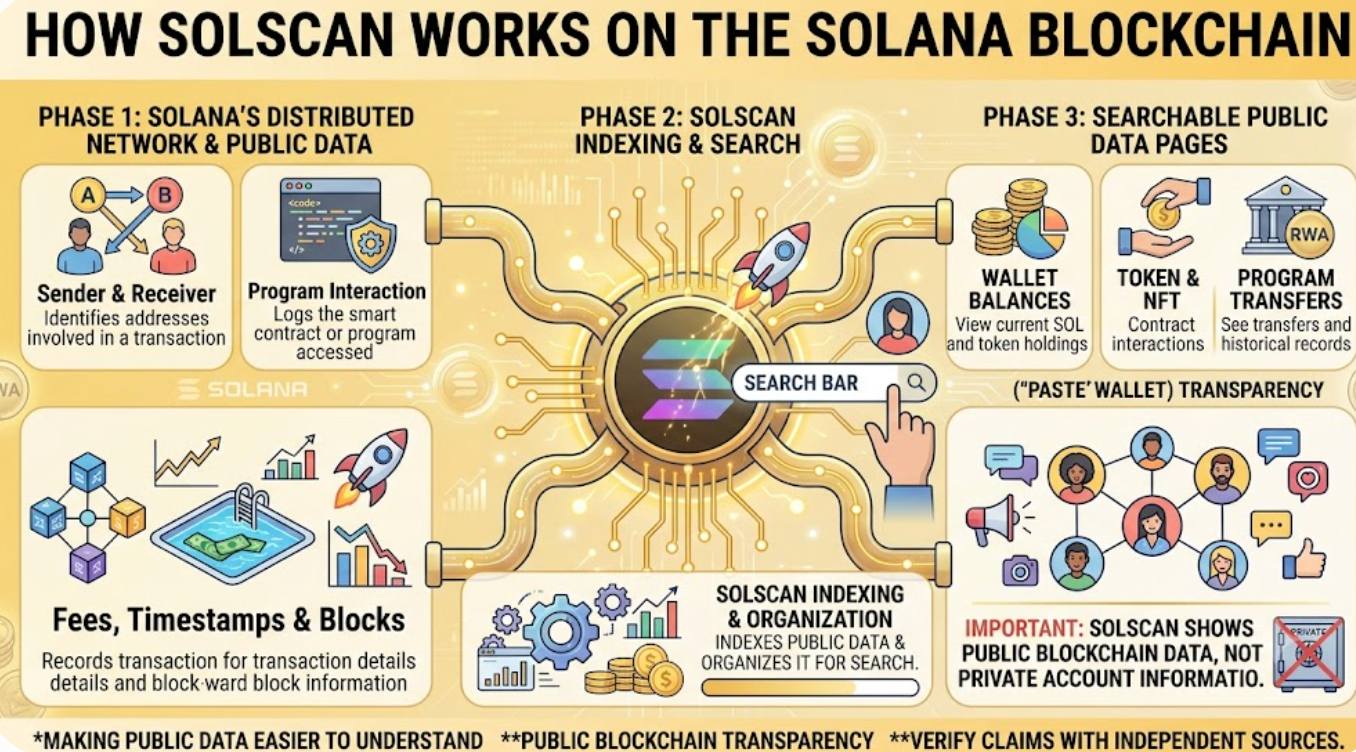
Solana records transactions across a distributed network of validators. Every confirmed transaction creates public data, including the sender, receiver, program interaction, token movement, fee, timestamp, and block information. Solscan indexes that public data and organizes it into searchable pages.
This is why a user can paste a Solana wallet address into Solscan and see balances, token holdings, NFTs, transfers, and program interactions. The explorer is not showing private account information; it is making public blockchain data easier to understand.
What Can You Search on Solscan?
Solscan supports several common search types. Most beginners start with a wallet address or transaction signature, while more advanced users may inspect token pages, program accounts, validator data, or DeFi activity.
| Solscan Feature | What It Helps You Check | Why It Matters |
|---|---|---|
| Transaction search | Signature, status, fee, block time, and confirmations | Confirms whether a transfer or swap succeeded |
| Wallet lookup | SOL balance, SPL tokens, NFTs, and transaction history | Helps users review public wallet activity |
| Token pages | Supply, holders, transfers, and contract details | Useful when researching a Solana token |
| Program pages | Smart contract and protocol interactions | Shows how apps and users interact on-chain |
| Validator data | Network participation and staking-related information | Helps users understand Solana infrastructure |
How to Check a Solana Transaction on Solscan
The most common use case is checking a transaction signature. After sending SOL, swapping a token, minting an NFT, or interacting with a DeFi protocol, wallets and apps usually provide a long transaction ID. Paste that signature into Solscan and the explorer will show whether the transaction succeeded, failed, or is still being processed.
A successful transaction page usually includes the transaction status, slot, block time, fee paid, signer address, and program instructions. If the transaction failed, Solscan may show an error message or failed instruction. This can help users understand whether the issue came from insufficient balance, slippage settings, an app error, or a network-related problem.
Solscan Wallet Address Lookup for Beginners
Solscan wallet lookup is helpful when users want a clearer view of an address. A wallet page can show the SOL balance, SPL token balances, recent transfers, NFT holdings, and DeFi interactions connected to that address.
However, beginners should avoid overreading wallet data. A wallet can receive spam tokens, dust transactions, fake NFTs, or misleading assets that were never requested. Seeing a token in a wallet does not automatically mean it is valuable, safe, or officially connected to a project.
Solscan Token and NFT Tracking
Solscan can also be used to research SPL tokens and NFT collections on Solana. Token pages may show supply, transfer activity, holder distribution, and contract-related information. These details can help users understand whether a token is actively traded, concentrated among a few wallets, or showing unusual transfer behavior.
For NFTs, Solscan can show ownership history and collection-related activity. This is useful for confirming whether a wallet holds a specific NFT, but it does not guarantee authenticity or market value. Users should still verify official collection links and avoid interacting with suspicious NFTs or unknown websites.
Solscan vs Solana Explorer
Solscan is one of several tools available for reading Solana blockchain data. The official Solana Explorer is another common option. Both can show transaction and account information, but users may prefer Solscan because of its interface, token pages, NFT views, and DeFi-friendly layout.
The practical difference is not that one changes the blockchain. Explorers are different windows into the same public network. If a transaction is confirmed on Solana, multiple explorers should generally reflect the same core result, even if their layouts and labels differ.
Why Solscan Matters for DeFi and Web3 Users
Solana is widely used for decentralized exchanges, NFTs, memecoins, gaming apps, wallet tools, staking, and Web3 experiments. As activity grows, users need a way to verify what happened without depending only on wallet notifications or social media claims.
Solscan gives users a practical research layer. It helps them check whether liquidity moved, whether a token contract is active, whether a wallet is accumulating or distributing assets, and whether a transaction actually reached the chain. For DeFi users, this kind of visibility is essential.
How Tapbit Users Can Use Solscan Alongside Market Tools
Solscan is useful for on-chain verification, while exchanges and market platforms are useful for price discovery, liquidity access, and portfolio decisions. Users who want to explore broader crypto markets can start with the Tapbit registration page to access trading features, market tools, and digital asset services.
The two tools serve different purposes. Solscan helps users read Solana blockchain activity. Tapbit helps users follow markets and manage exchange-based crypto activity. Combining both perspectives can make research more complete, especially when evaluating fast-moving Solana tokens.
Solscan Safety Tips and Common Mistakes
Solscan is read-only, which means it should not ask for seed phrases, private keys, wallet passwords, or direct fund transfers. If a website pretending to be an explorer asks for private wallet credentials, it should be treated as suspicious.
Users should also be careful with links found in token descriptions, wallet spam, or NFT metadata. Blockchain explorers can display data that exists on-chain, but they do not automatically verify every project behind that data. A token name can be copied, a fake asset can mimic a real brand, and a contract can appear active while still being risky.
Conclusion
Solscan is one of the most useful beginner tools for understanding Solana blockchain activity. It helps users verify transactions, inspect wallet addresses, review token and NFT data, and understand how DeFi activity appears on-chain.
Still, Solscan should be used as a research tool, not as a guarantee of safety. Public blockchain data can show what happened, but users must still judge whether a token, wallet, NFT, or protocol is trustworthy. The best approach is to combine explorer data, official project information, market liquidity checks, and careful risk management.
FAQ
What is Solscan used for?
Solscan is used to search and read Solana blockchain data, including transactions, wallet addresses, tokens, NFTs, programs, and validators.
Is Solscan an official Solana wallet?
No. Solscan is a blockchain explorer, not a wallet. It displays public on-chain data and does not custody user funds.
Can Solscan show if a Solana transaction succeeded?
Yes. Users can paste a transaction signature into Solscan to check status, fees, block time, and related instructions.
Is Solscan safe to use?
Solscan is generally used as a read-only explorer. Users should never enter private keys, seed phrases, or wallet passwords into any explorer or unknown website.
Can Solscan prove a token is legitimate?
No. Solscan can show token data and on-chain activity, but it cannot guarantee that a token is safe, official, liquid, or valuable.


