
A DApp (decentralized application) is the app you see and use — like Uniswap or a blockchain game. A smart contract is the backend code running on the blockchain that makes that app work.
Think of it this way:
-
Smart contract = the engine, transmission, and wheels
-
DApp = the whole car, with a steering wheel, dashboard, and cup holders
You don’t need to know how every bolt works, but understanding the difference helps you know where the risks are — and where the magic happens.
What Is a DApp?
A DApp is software that runs on a blockchain or peer‑to‑peer network instead of on a company’s private servers. No single person or organization controls it. The backend is spread across thousands of independent computers (nodes) around the world.
Because there’s no central operator, DApps are usually:
-
More transparent — the rules are public code
-
Harder to censor — no one can just “pull the plug”
-
Less trustworthy of a single company — but you still have to trust the code
Take Uniswap. On the surface, it looks like any other trading app: you see price charts, a swap box, your wallet balance. You click “Swap” and it happens.
Under the hood, smart contracts handle everything: holding liquidity, executing the trade, updating balances. The interface (the website) just talks to those contracts. Together — contracts + frontend + token model — that’s the DApp.
So a DApp is the complete user‑facing product. It wraps smart contracts in something a normal person can use.
What Is a Smart Contract?
A smart contract is just code deployed on a blockchain at a specific address. It defines rules like: “If person A sends 10 USDC to this contract, then send person A 0.005 ETH back.” Once deployed, the blockchain automatically enforces those rules — no middleman needed.
Key characteristics
|
Feature |
What It Means |
|
Deterministic |
Same inputs → same outputs. No surprises. |
|
Transparent |
Anyone can read the code and see the history. |
|
Immutable (usually) |
Once deployed, you can’t change it easily. That’s good (no rug pulls) but also bad (bugs can’t be patched). |
|
Owns assets |
The contract can hold and move tokens based on its logic. |
The USDC token contract on Ethereum is a smart contract. It has a balance for every address and a transfer() function. When you send USDC, you’re calling that contract. No bank, no approval — just code.
But a smart contract alone isn’t an app. It doesn’t have a nice UI, charts, or notifications. Developers build those on top to create a DApp.
How They Work Together
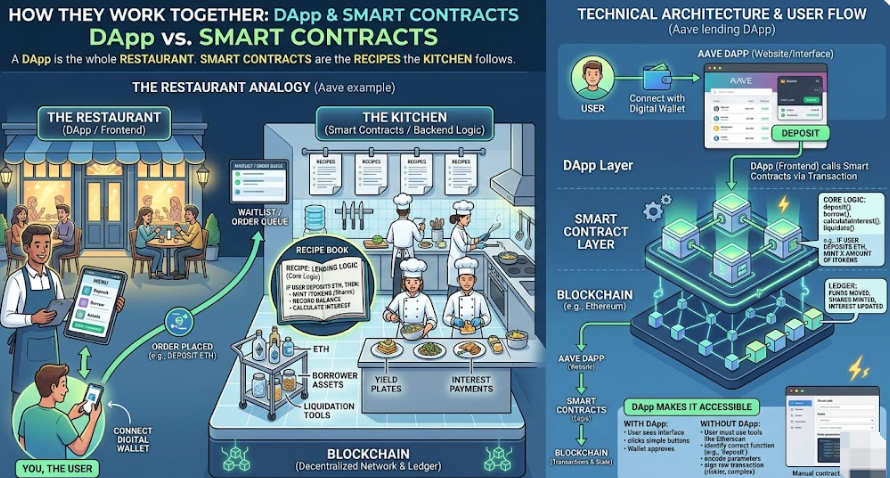
Here’s the relationship in one sentence:A DApp is the whole restaurant. Smart contracts are the recipes the kitchen follows.
-
The smart contract holds the logic: “If user deposits ETH, mint them x amount of shares.”
-
The DApp provides the menu, the waiter, the tables, and the payment terminal.
You, the user, only see the DApp. But every click that changes anything on‑chain (swap, lend, mint) sends a transaction to a smart contract.
Example: Aave (lending DApp)
|
Layer |
What it is |
|
Smart contracts |
Core logic: deposit, borrow, calculate interest, liquidate positions |
|
DApp |
The website where you connect your wallet, see your positions, and click buttons |
|
You |
Use the DApp → DApp calls smart contracts → contracts move your funds |
Without the DApp, you could still call Aave’s contracts directly from Etherscan or your wallet. But you’d need to know the function names, encode parameters, and be very careful. The DApp makes it accessible.
How to Start Using DApps and Smart Contracts
1. Get a wallet
You need a crypto wallet to interact with any DApp. Popular options: MetaMask (Ethereum/BSC), Phantom (Solana), or a multi‑chain wallet like Trust Wallet.
2. Fund it with native tokens
You’ll need the blockchain’s native coin for gas fees:
-
Ethereum → ETH
-
BNB Smart Chain → BNB
-
Solana → SOL
-
TRON → TRX
Buy on an exchange (like Tapbit) and withdraw to your wallet.
3. Connect to a DApp
Go to a DApp’s website (e.g., app.uniswap.org). Click “Connect Wallet,” choose your wallet, and approve the connection.
4. Start small
Do a tiny transaction first. Swap $5 worth of tokens. See how it feels. Check the transaction on a block explorer.
5. Read contract addresses
Most DApps list their smart contract addresses in their docs or on GitHub. You can look them up on Etherscan to see the code, the balance, and recent activity.
FAQ
Is every DApp powered by smart contracts?
Most are, yes. On blockchains like Ethereum, Solana, or BSC, the core logic of a DApp lives in smart contracts. Some “DApps” that claim to be decentralized but run most of their backend off‑chain are better called “hybrid” — and often less trustworthy.
Can a smart contract exist without a DApp?
Absolutely. The USDC token contract is a smart contract, but it’s not a DApp by itself. Developers and power users interact with it directly via wallets or scripts. Most people prefer a DApp (like a crypto wallet app) to do the same thing.
Which is safer?
It depends. A well‑audited smart contract with a simple, immutable design is very safe as code. But if the DApp frontend is compromised (phishing site, malicious JavaScript), you could sign a transaction that drains your wallet.
Best practice:
-
Use DApps you trust and that have been around for a while.
-
Double‑check the URL.
-
For large amounts, consider interacting directly with the smart contract via a block explorer — but only if you really know what you’re doing.
Do I need to learn to code to use DApps?
No. That’s the whole point of DApps — they hide the complexity. But learning to read basic smart contract info (like verifying a contract address on Etherscan) is a valuable security skill.
How do I avoid getting scammed?
-
Never share your seed phrase. No DApp will ever ask for it.
-
Check contract addresses against official docs.
-
Start with small amounts.
-
Look for audits from reputable firms (but remember: audits don’t guarantee safety).
-
Use wallets with transaction simulation (like Rabby or MetaMask’s “blind signing” warnings).


