
If you're still connecting your wallet directly to Uniswap or Raydium's default frontend to trade, you're already behind. You are trading blind, and worse, you're probably someone else's exit liquidity.
With DeFi Total Value Locked (TVL) hovering around $95 billion and daily DEX volume pushing $8.5 billion, the game has moved entirely to analytics terminals. Right now, DEX Screener is the absolute center of gravity in the crypto trenches. It scrapes raw data from over 80 blockchains and 50+ DEXs, turning chaotic on-chain actions into readable TradingView charts.
But there's a huge disconnect. Retail traders use it to just check prices; prop desks use it as a high-speed execution hub. If you want to survive the on-chain markets, here is the desk's guide on how to actually use DEX Screener.
Upgrade from a Viewer to an Execution Terminal
A year ago, DEX Screener was basically just a charting site. Today? It’s a fully weaponized command center.
Retail is still fumbling with MetaMask pop-ups and slipping on gas fees. The guys making money have completely bypassed that. Through custom browser extensions (like the recent v3.4 updates), DEX Screener is now hardwired directly into Telegram sniper bots like Photon, Trojan, and BullX.
Traders are literally binding buy/sell hotkeys to their mouse. They spot a fresh liquidity pool hit the "New Pairs" tab, bypass the clunky DEX interfaces entirely, and snipe the token in milliseconds. If you're trying to trade the low-cap markets manually, you have to upgrade your tooling to match the speed of your competition.
Dodge the "Trending" Trap (And Use Real Filters)
Let’s talk about the biggest trap on the platform.
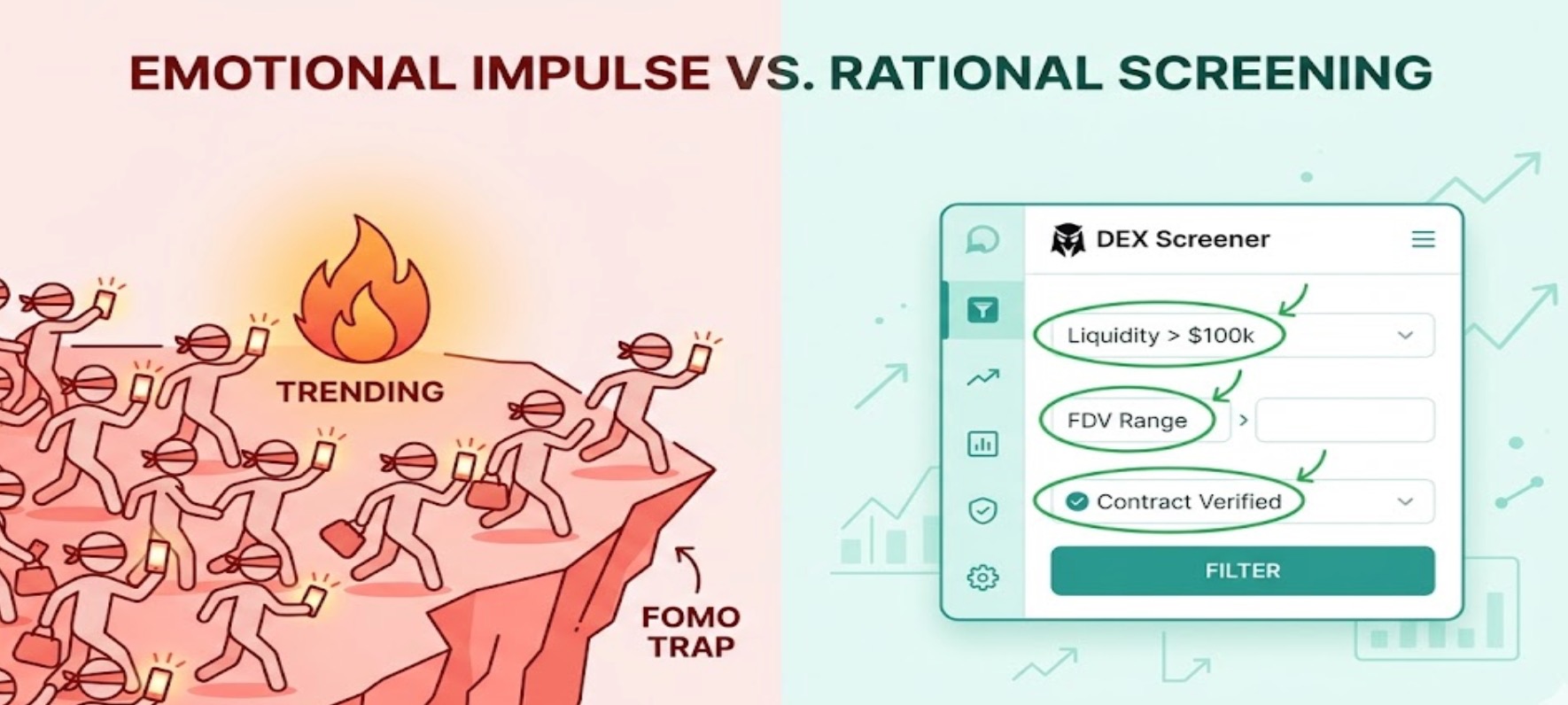
New users open the homepage, look at the top "Trending" tokens, and assume smart money is aggressively bidding them up. They aren't.
Industry veterans, including Coinbase’s Conor Grogan, have been calling this out heavily. A massive chunk of those top slots are quite literally paid listings. Marketing teams for low-effort—and sometimes outright scam—projects pay to artificially pin their tokens to the top of your screen to manufacture FOMO. We even watched a meme coin literally named $DEX pump 61% in a single day strictly off the platform's brand recognition.
The Desk Rule: Ignore the front-page noise entirely. Instead, use the platform's custom filters. Set hard minimums for Fully Diluted Valuation (FDV), 24-hour volume, and locked liquidity. We also lean heavily on their "Moonshot" feature, which specifically filters out pre-sales and screens for fair-launch tokens with capped supplies and audited smart contracts.
Set Up Your Multichart Like a Prop Desk
If you want to trade like a desk, you need to structure your data like one.
DEX Screener lets you run up to 16 custom TradingView charts on a single monitor. We use this "Multichart" layout strictly to track sector momentum. If Solana AI tokens start catching a bid, we tile the top 6 liquidity pairs side-by-side. It lets us see exactly where the volume is rotating in real-time, rather than constantly clicking back and forth between tabs.
On the institutional side, the real edge is in the API. Algorithmic traders are sucking up DEX Screener’s high-throughput pricing data and piping it directly into their backtesting models, hunting for cross-chain arbitrage before retail even sees the 1-minute candle print.
The Tapbit Playbook: Bridging On-Chain to CEX
On-chain data is the ultimate leading indicator. We use DEX Screener relentlessly to find the trend, track wallet flows, and see which narratives actually have volume backing them up.
But executing on-chain is a completely different beast. Between brutal slippage, high gas fees, and MEV (Maximal Extractable Value) front-running bots, the hidden taxes of DEX trading will slowly bleed your PnL dry.
Our playbook is simple: we use the screener to spot the alpha early. Once a token matures, builds real liquidity, and graduates from the decentralized trenches, we execute our actual size via perpetual futures and deep spot markets.
Want to trade the volatility without the MEV slippage?
-
Ready to get started? Register your Tapbit account today to access institutional-grade matching engines and zero gas fees.
-
Already set up? Log in to your Tapbit terminal to execute your trades.
-
Explore our deep liquidity pools and latest listings directly on Tapbit.
Frequently Asked Questions (FAQ)
What exactly does DEX Screener do?
It is an analytics platform that pulls raw, real-time data directly from over 80 blockchains and 50+ decentralized exchanges (like Uniswap and Raydium). It organizes this data into readable TradingView charts, showing price, volume, and liquidity updates every few minutes.
Why shouldn't I buy coins that are on the DEX Screener "Trending" page?
The "Trending" page is often manipulated. Many of the top spots are actually "Paid Listings," meaning marketing teams pay to have their tokens featured there to create fake hype. Always use custom filters for volume and liquidity instead of blindly buying trending tickers.
How do professional traders buy tokens so fast on DEX Screener?
Pro traders rarely use the standard DEX interface. They use browser extensions to link DEX Screener directly to Telegram sniper bots (like Trojan or Photon). This allows them to execute trades with a single click or hotkey the second a new token pool launches.


