Whether you are switching to a more secure email provider, leaving a job, or just cleaning up your old digital accounts, you might need to update the email address linked to your Tapbit account.
Because your email is the primary way we verify your identity and authorize withdrawals, changing it requires a few strict security steps. We don't make it easy for a reason: we want to make sure nobody but you can alter your core account details.
Here is a straightforward, step-by-step walkthrough on how to update your registered email address safely.
Before You Start: The Security Checklist
You cannot change your email address if your account is not already secured. Before you even click into your settings, make sure you have Two-Factor Authentication (2FA) active.
You must have either Google Authenticator or Phone (SMS) Verification bound to your Tapbit account.
-
If you haven't done this yet, stop here and read our guide: The Tapbit Guide to Account Security: Setting Up Two-Factor Authentication (2FA)
Step-by-Step Instructions
Step 1: Head to the Security Center
-
Log into your Tapbit account on your desktop or mobile browser.
-
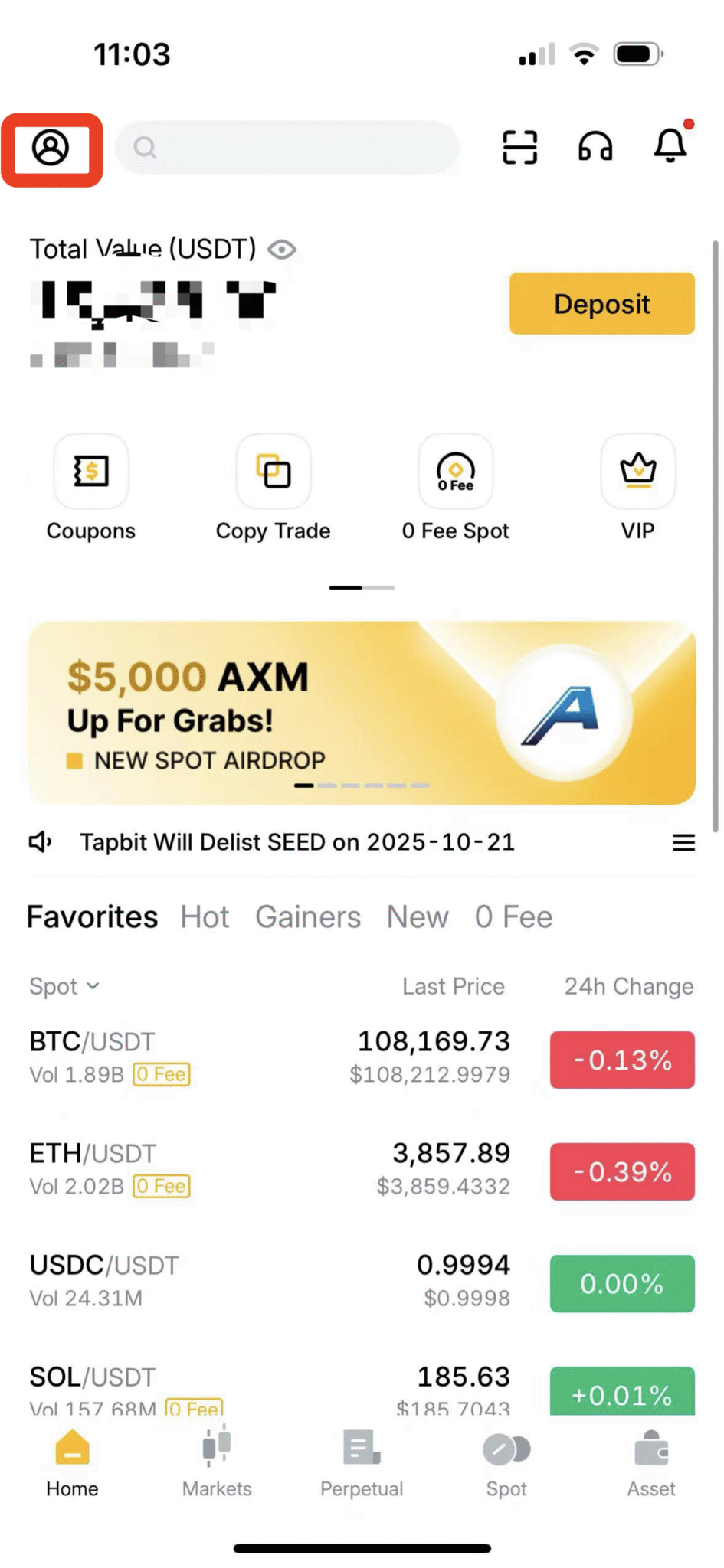
Look for your profile icon in the top-right corner of the homepage.
-
Click the icon and select Security Center from the dropdown menu.
Step 2: Start the Change Process
-
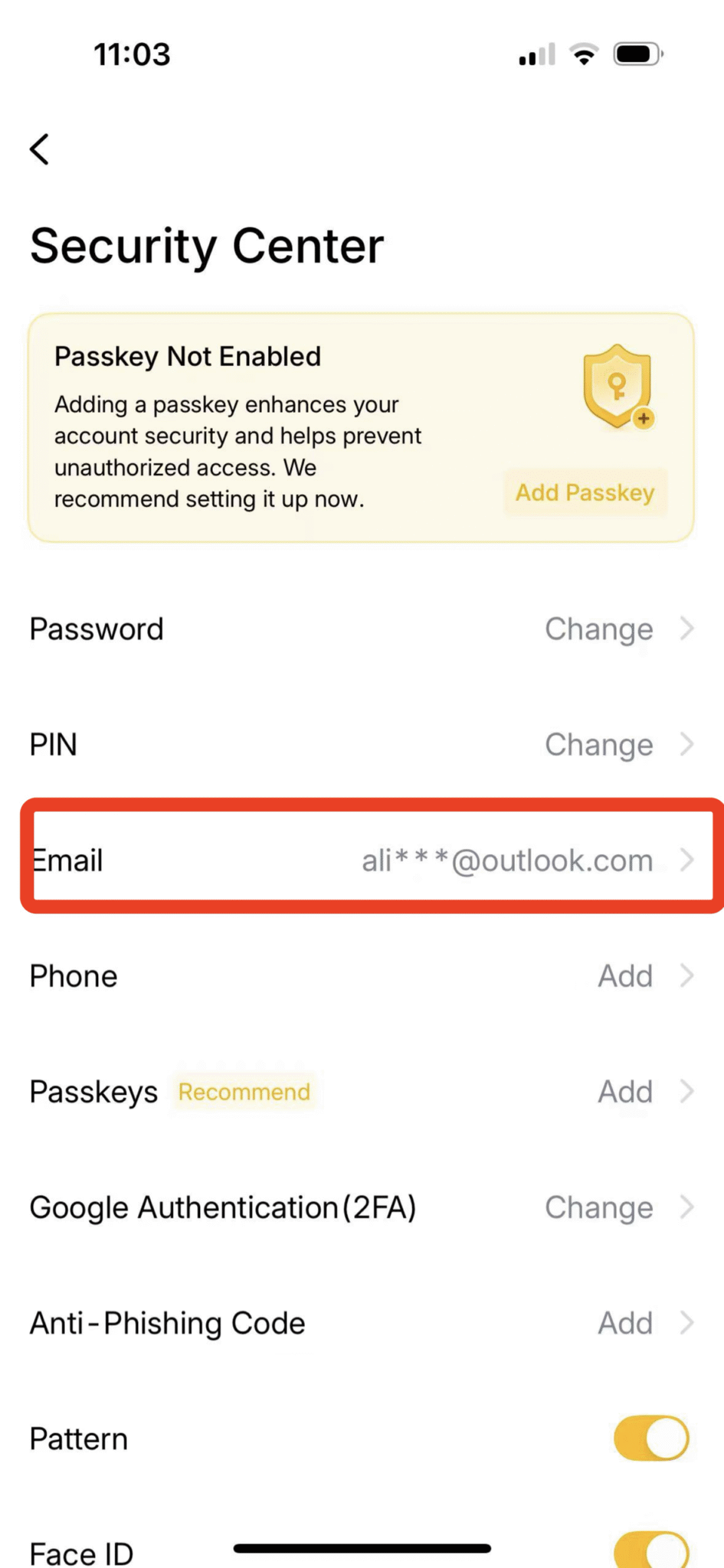
Once you are on the Account Security page, find the section labeled Email.
-
Click the Continue button next to it. This tells the system you want to initiate a modification
Step 3: Add and Verify the New Email
-
A pop-up box will ask for your new details. Carefully type in the new email address you want to use.
-
Click the Send button next to that field.
-
Go open the inbox for your new email address. Find the verification code Tapbit just sent you, and type it into the box on the screen.
Step 4: Prove It’s Actually You (Final Authentication)
This is the most important step. To prove a hacker isn't just trying to lock you out of your own account, you have to verify the change using your old credentials.
-
The system will prompt you to click Send to receive a separate verification code sent to your old (current) email address. Enter that code.
-
Next, open your phone and enter the current 6-digit code from your Google Authenticator app (or the SMS code we text you, depending on your setup).
-
Once you have entered the code from the new email, the old email, and your 2FA app, click Continue.
Your email address is now officially updated!
⚠️ Mandatory Security Lock (Please Read)
To protect your funds, ALL withdrawals will be disabled for exactly 24 hours the moment your email change is successful.
This is a hardcoded security feature designed to stop hackers from draining your account if they somehow managed to change your email. This 24-hour lock is automatic and cannot be bypassed or sped up by Customer Support. It will lift automatically when the time is up.
Securing Your Digital Future
Keeping your account credentials up to date is one of the simplest and most effective ways to protect your digital assets. While the verification steps and the 24-hour withdrawal lock might seem strict, they are purpose-built to ensure that you—and only you—maintain total control over your portfolio.
If you are ready to update your details or review your current security settings, log in to your Tapbit account today and navigate straight to the Security Center.
Frequently Asked Questions (FAQ)
What if I completely lost access to my old email address and can't get the verification code?
If you cannot log into your old email to retrieve the legacy verification code (Step 4), the automated system will not let you proceed. You will need to contact Tapbit Customer Support directly. They will require you to go through a manual identity verification process (usually involving submitting your ID and a video selfie) to prove you own the account before they can manually reset the email for you.
Will changing my email log me out of the Tapbit mobile app?
Yes. As a security precaution, changing your core login credentials will automatically log you out of all active sessions across all devices. You will need to log back in using your new email address and your existing password.
Can I use an email address that is already registered to another Tapbit account?
No. Every Tapbit account must have a unique email address. If you try to switch to an email that is already in our system, you will receive an error message.


