Whether you are tracking a recent deposit, verifying a withdrawal, or troubleshooting a delayed transfer, the most important piece of information you need is your Transaction ID (TxID).
This guide will explain exactly what a TxID is and provide a straightforward, step-by-step walkthrough on how to locate it within your Tapbit account.
What is a Transaction ID (TxID)?
A Transaction ID (TxID), often referred to as a transaction hash, is a unique string of letters and numbers assigned to every single transaction verified and added to a blockchain.
Think of it as a digital fingerprint—no two transactions share the same TxID. It acts as a permanent, public receipt on the decentralized ledger. Whether you are depositing fiat or withdrawing crypto, the TxID encapsulates all the essential details of that specific movement of funds, including the sender address, receiver address, timestamp, and the exact amount transferred.
Having your TxID allows you to act as your own auditor. By pasting this ID into a public blockchain explorer (like Etherscan for Ethereum or Mempool for Bitcoin), you can track the live status, network confirmations, and detailed history of your funds in real-time.
Step-by-Step: How to Find Your TxID on Tapbit
Locating your transaction history and associated TxIDs on the Tapbit platform is a quick process. Just follow these steps:
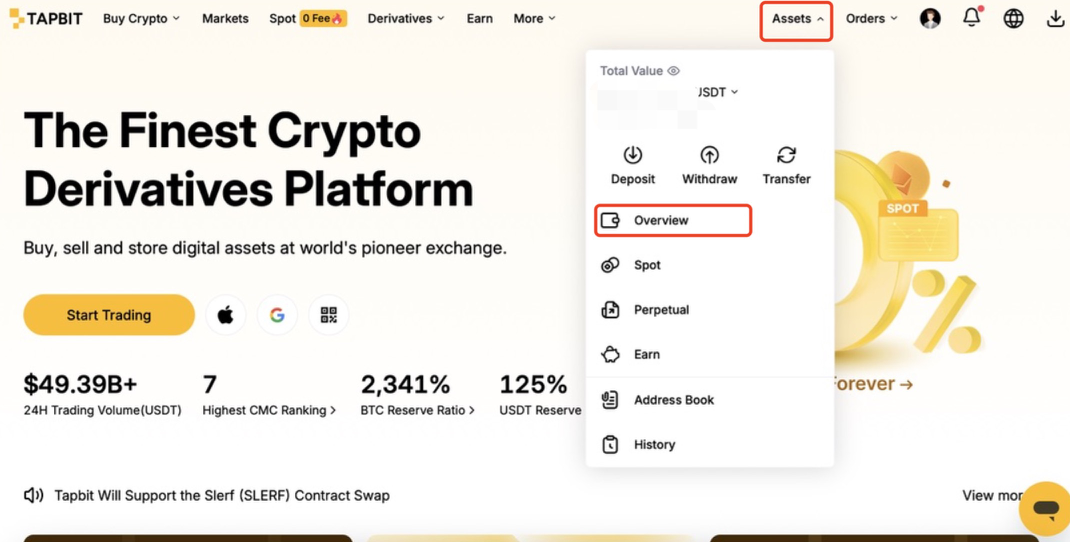
Step 1: Access Your Asset History
-
On the main navigation menu, hover over the [Assets] tab.
-
Select [Overview] from the drop-down menu.
-
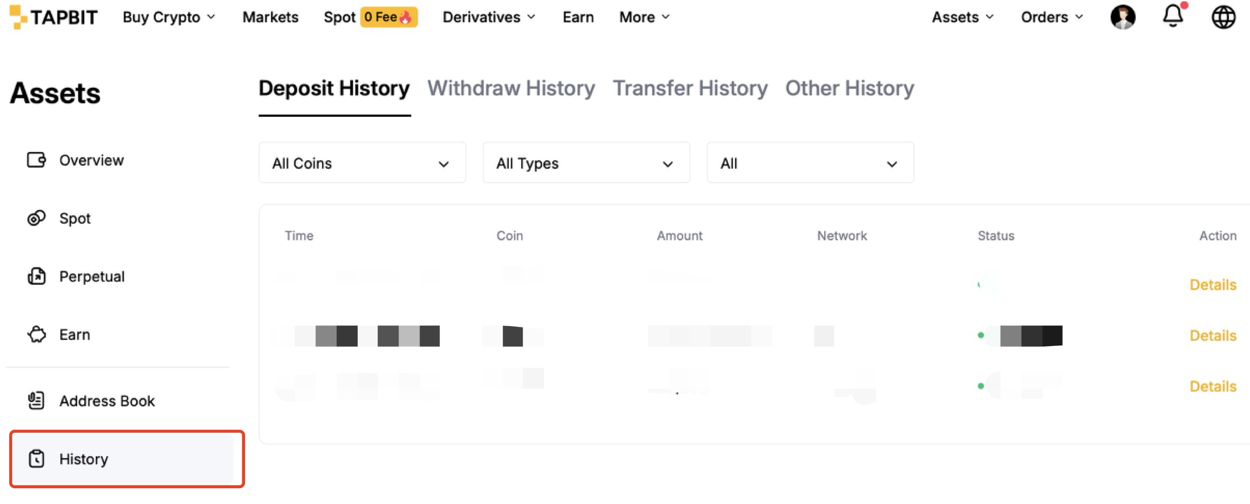
Once on the Overview page, click on the [History] tab. This section contains your complete, chronological record of all deposits and withdrawals.
Step 2: Locate the Transaction Details
-
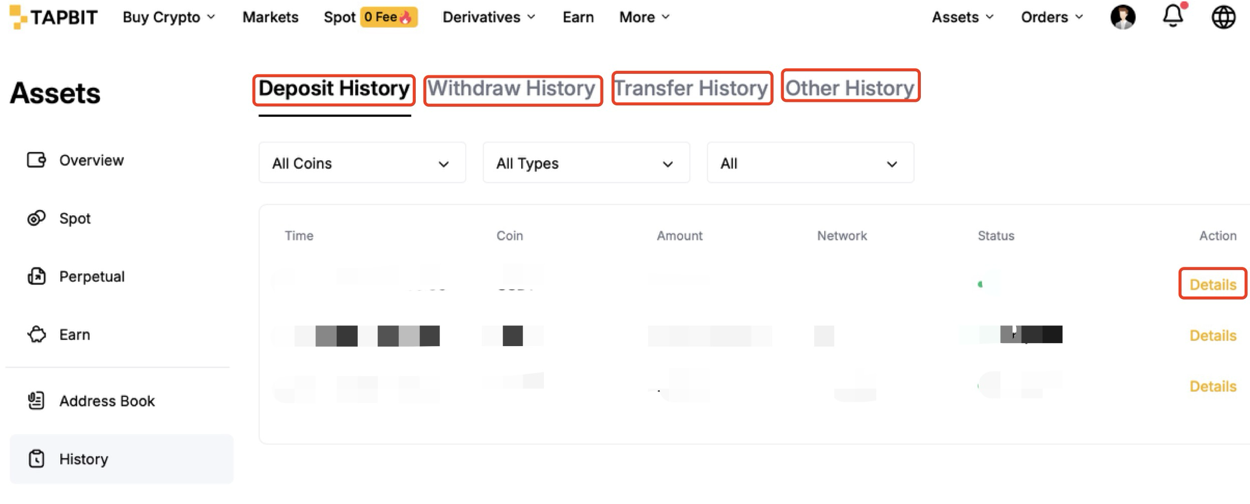
Scroll through your history or use the filter options to find the specific deposit or withdrawal you want to track.
-
Click the [Details] button situated next to that specific transaction.
-
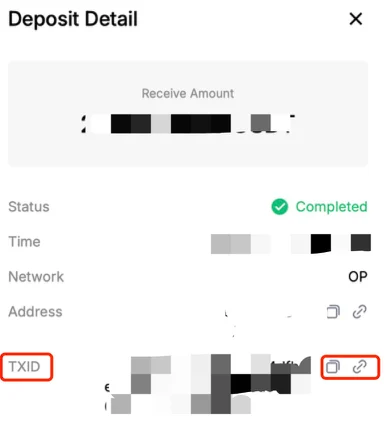
A panel will open displaying the transaction's specifics. Your unique TxID will be listed here. You can click the copy icon next to it to easily save it to your clipboard.
How to Use Your TxID
Once you have copied your TxID, it serves two primary functions:
-
Self-Tracking: In many cases, Tapbit provides a hyperlinked TxID. Clicking directly on the TxID in your transaction details will automatically redirect you to the relevant blockchain explorer. Here, you can watch the network nodes confirm your transaction. (Note: During periods of high network congestion, confirmations may take longer than usual.)
-
Customer Support: If a deposit has not arrived in your account or a withdrawal seems stuck, the Tapbit Customer Support team will need your TxID to investigate. Providing this ID in your initial support ticket acts as irrefutable proof of your transfer and helps our team locate your funds much faster.
Conclusion
Mastering the use of your Transaction ID is a fundamental skill in crypto. It removes the guesswork from deposits and withdrawals, empowering you to independently track your funds on the blockchain with absolute confidence. By knowing exactly where to find this digital receipt, you maintain total visibility and control over your digital assets at all times.
Ready to put this into practice? Log in to your Tapbit account to review your recent transaction history and familiarize yourself with the dashboard.
If you are new to the platform and looking for a secure, transparent trading environment, head over to the Tapbit homepage to explore our features, or register your account today to start your crypto journey.
Frequently Asked Questions (FAQ)
What exactly is a Transaction ID (TxID)?
A TxID, also known as a transaction hash, is a unique string of letters and numbers that acts as a digital fingerprint for your cryptocurrency transaction. It serves as a permanent, public receipt on the blockchain, containing critical details like the sender address, receiver address, and the exact amount transferred.
How do I use a TxID to track my funds?
You can paste your TxID into a public blockchain explorer (such as Etherscan for Ethereum or Mempool for Bitcoin) to view the live status and network confirmations of your transfer. In many cases, Tapbit provides a hyperlinked TxID in your transaction details that you can click to go directly to the explorer.
Why is my transaction taking so long even though I have a TxID?
Every blockchain transaction requires a certain number of confirmations from network nodes to be fully processed and settled. During periods of high network congestion, these node confirmations can take much longer than usual to complete.


